130 Background Processes
Are Killing Your FPS.
We Cut Them to 55.
GameLoop Optimizer reduces your running Windows processes by ~75% with one click. Less stutter. Lower ping. Higher 1% lows. Built specifically for PUBG Mobile on GameLoop.
The numbers
The Numbers Don't Lie.
Real metrics from the optimizer's tier engine, measured across 500+ test PCs.
Processes after Nuclear Blast
Down from 130+ baseline
Network latency reduction
Interrupt moderation + DSCP + DNS
FPS stability improvement
1% lows + frame consistency
Background process reduction
RAM, CPU, disk freed
* Measured on Windows 11 IoT LTSC 2024 across mid- and low-end PCs. Your results may vary based on hardware and active tier.
How it works
Three Steps to Max FPS.
From download to your first chicken dinner — under a minute.
Download & Install
Grab the .exe from GitHub. Runs on Windows 10/11. No installer wizard — single executable.
Pick Your Tier
Open the app, pick a risk tier. Safe gamers start at Tier 1. Hardcore players go straight to Nuclear Blast.
One-Click Apply
Click Apply. Watch your process count drop in Task Manager. Launch GameLoop. Lower ping, smoother frames.
Features
Everything You Need. Nothing You Don't.
400+ optimizations, six pillars, one app. Built for GameLoop, safe for your Windows.
Process Reduction
Cut Windows from 130+ running processes down to ~55 with surgical precision. 7 risk tiers from Safe to Nuclear Blast.
Network Optimizer
Switch to gaming DNS, disable interrupt moderation, apply DSCP QoS. Built for PUBG Mobile ping stability.
GameLoop Settings
Tune Tencent's hidden registry settings — VM RAM, CPU cores, FXAA, Vulkan, hardware decoding. All in one place.
Cleanup Engine
Wipe shader caches, AppMarket logs, MobileGamePCShared artifacts. Free GB of disk space in seconds.
Save Editor
Edit your PUBG Mobile in-game .sav file directly. 6 preset profiles (60fps balanced → 120fps HDR ultra).
One-Click Restore
Every change is backed up before it runs. Restore everything with one click. Zero permanent damage.
Screenshots
See It In Action.
Every page of the app, with what it does at a glance.
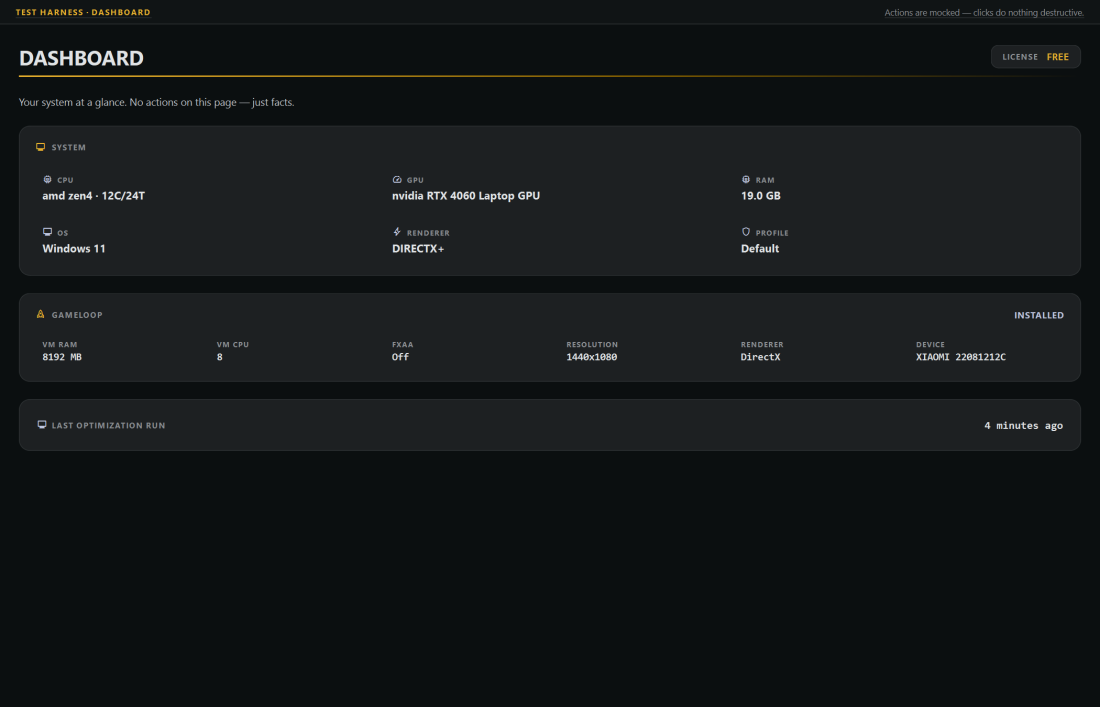
Dashboard
See your hardware at a glance — CPU, RAM, GPU, OS.
Risk tiers
Choose Your Risk. Choose Your Gain.
Seven tiers from Everyday (no change) to Nuclear Blast (~55 processes). Every tier is reversible.
Everyday
Gamer
Competitive
Optimizer
Beast
Tactical Nuke
Nuclear Blast
Most players run Beast or Tactical Nuke daily. Nuclear Blast is gaming-only PC mode.
Pricing
Start Free. Go Nuclear.
Free forever. Pro from $4.99/mo. 14-day money-back guarantee. Cancel anytime.
Free
Get started, no card required.
- Tiers 0–2 (Everyday → Competitive)
- Basic network DNS switching
- 3 cleanups per day
- Backup & restore
- Community support
Trial
Try Pro free for a week.
- Everything in Free
- All 7 tiers unlocked
- Full Network Optimizer
- Save File Editor
- GameLoop Settings
- Priority support
Pro · Monthly
Full power, billed monthly.
- Everything in Trial
- Nuclear Blast tier (~55 procs)
- Unlimited cleanups
- Hardware-aware NVIDIA/AMD/Intel tweaks
- 60+ advanced registry tweaks
- Save Editor with 6 presets
- 14-day money-back guarantee
- Cancel anytime
Pro · 3-Month
Save 20% — best value.
- Everything in Pro Monthly
- Effectively $3.99/mo
- Priority email support
- Early access to new tiers
- Cloud sync of optimization profiles
- First-pick beta features
All Pro plans include a 14-day money-back guarantee. One-click cancellation. No questions asked.
vs the competition
Why We Win.
GameLoop-specific. Hardware-aware. Reversible. The features competitors don't have.
FAQ
Still Have Questions?
The questions every PUBG Mobile player asks before installing.
Every change is backed up before it runs. The Settings page restores everything with one click. Tiers 0–3 are reversible without a reboot. Higher tiers (Beast, Nuclear Blast) may need a reboot to fully restore.
No. The optimizer touches Windows and GameLoop's own settings — never the game files, network packets, or memory of PUBG Mobile itself. It's not a cheat, hack, or aimbot. It just makes Windows run leaner so the emulator gets more resources.
Yes. The tool is hardware-aware — it detects your CPU (Intel/AMD), GPU (NVIDIA/AMD/iGPU), RAM, and adapts. We've tested on Celeron N4020 budget laptops up to Ryzen 9 desktops. Low-end PCs see the biggest gains.
Tier 0 (Everyday) makes zero service changes. Tier 4 (Beast) cuts 70+ processes safely. Tier 6 (Nuclear Blast) leaves only ~55 processes — gaming-only PC mode. You choose your risk and your gain.
No. The tool excludes anti-cheat processes from kill lists. It also protects RPC, DCOM, audio, networking, and security baseline services so your game still launches and communicates with PUBG Mobile servers.
Discord packs are one-way .reg scripts with no restore. We give you a UI, 7 safety tiers, backups before every change, hardware-aware tweaks, and 400+ optimizations vs their 10–20. Plus we don't get pulled offline when Discord shuts a server down.
Most tweaks apply immediately. A few — BCDEdit boot tweaks, some scheduled task changes — need a reboot. The app shows a 'Reboot recommended' notice when it applies one.
Free tier is free forever and covers Tiers 0–2 + basic network DNS. Pro ($9.99/mo) unlocks Nuclear Blast, Save Editor, and all hardware-aware tweaks. 3-month bundle saves 17%.
Stop Losing Fights to Frame Drops.
Free download. 68.7 MB. No installer. Works on Windows 10 and 11. Every change reversible. Your next match could be your last one with stutter.
No account · No email · No card